
반응형
www.hackerrank.com/challenges/occupations/problem
Occupations | HackerRank
Pivot the Occupation column so the Name of each person in OCCUPATIONS is displayed underneath their respective Occupation.
www.hackerrank.com
해결 방법 : SET을 이용한 임의 변수, 서브 쿼리 SELECT 안에서 CASE문
- occupations를 읽어 오면서 각 사람이 몇번째 row에 위치해야 할지 나타내는 '순서'를 가리키는 변수를 생성한다.
- occupations에서 읽어온 row 데이터가 어떤 직업인지 CASE문으로 판별한 후에, 해당 직업의 '순서' 변수를 +1 해주며 저장함으로써 각 직업 마다의 row 순서를 계산한다.
- 따라서, 서브 쿼리의 결과물은 {해당 직업 column에서의 순서, ..., name(현재 직업 column), ...} * occupations row 개수가 된다.
- 메인 쿼리에서 '순서' 변수로 GROUP BY
SET @d_r = 0, @p_r = 0, @s_r = 0, @a_r = 0; -- rows for doctor, professor, singer, actor

SELECT MAX(d), MAX(p), MAX(s), MAX(a)
FROM (
    SELECT case occupation when 'Doctor' then @d_r := @d_r + 1
                            when 'Professor' then @p_r := @p_r + 1
                            when 'Singer' then @s_r := @s_r + 1
                            when 'Actor' then @a_r := @a_r + 1 end as each_row,
            case when occupation = 'Doctor' then name end as d,
            case when occupation = 'Professor' then name end as p,
            case when occupation = 'Singer' then name end as s,
            case when occupation = 'Actor' then name end as a
    FROM occupations
    ORDER BY name
    ) as o
GROUP BY each_row;
FROM 절의 서브 쿼리가 어떤 역할을 하는지 직관적으로 보여주기 위해,
이 쿼리를 개별로 실행하면 다음과 같은 결과가 나온다.
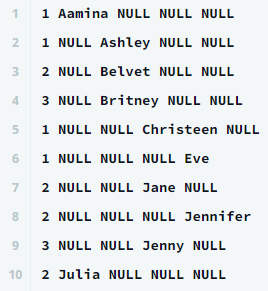
여기서 첫번째 애트리뷰트 each_row로 GROUP BY를 해주고,
MAX나 MIN 같이 기존에 존재하는 값을 가져오는 집계 함수를 사용해서
NULL이 아닌 값을 추출한다.
반응형
'IT study > SQL' 카테고리의 다른 글
| New Companies (+ 형 변환) (0) | 2021.04.22 |
|---|---|
| Binary Tree Nodes (0) | 2021.04.18 |
| 15 days of learning SQL (0) | 2021.04.15 |
| Interviews (0) | 2021.04.15 |
| The PADS (CONCAT, SUBSTR) (0) | 2021.04.13 |